How to Make a Baby Shower Card Online? - Complete Step-by-Step Guide
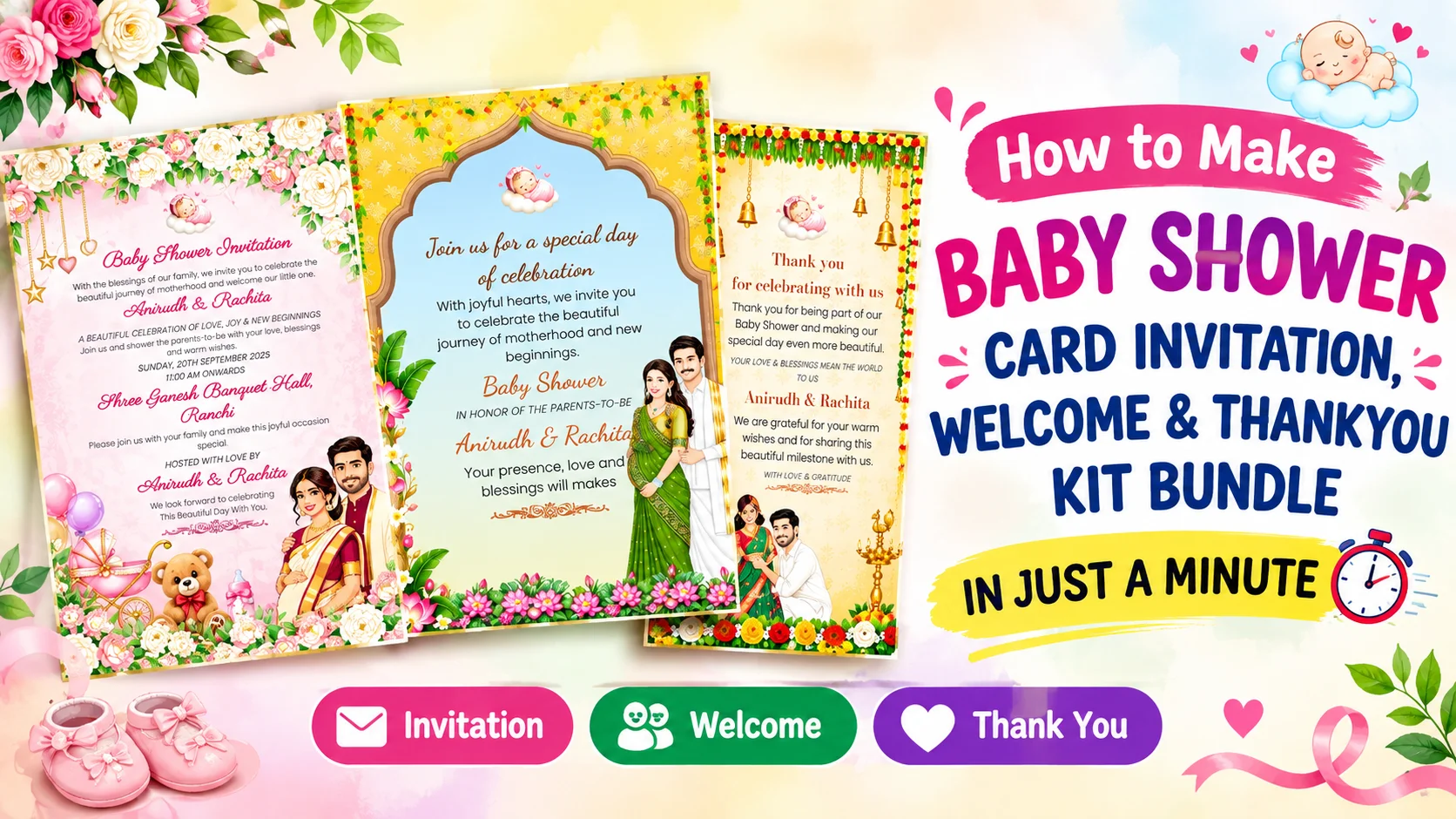
Planning a baby shower is a special moment for every family. One of the first things you need is a beautiful baby shower invitation card to invite your friends, relatives, and loved ones. Today, you do not need a professional designer or complicated software to create an invitation. With an online baby shower card maker, you can create a personalized and beautiful baby shower invitation in just a few minutes.
Whether you are planning a traditional Indian Godh Bharai, a modern baby shower party, or a simple family celebration, an online baby shower invitation maker makes the entire process easy. You can choose a ready-made template, add your event information, customize the colors and text, upload photos if required, and download your final card for printing or sharing on WhatsApp.
How to Make a Baby Shower Card Online?
Creating a baby shower invitation online is simple. You can follow the steps below to design your own invitation card without any professional design experience.
Step 1: Choose a Baby Shower Invitation Template
Start by selecting a beautiful baby shower invitation card template. A good template gives your invitation a professional appearance without requiring you to design everything from scratch.
You can choose from different styles such as floral baby shower cards, cute baby-themed designs, elegant pastel invitations, traditional Indian designs, modern minimal cards, and Godh Bharai invitation templates.
Choose a beautiful baby shower invitation template
Before selecting a design, think about the theme of your celebration. For a traditional ceremony, a floral or Indian-style Godh Bharai card may look perfect. For a modern celebration, you can choose pastel colors, cute baby illustrations, flowers, teddy bears, clouds, stars, or elegant typography.
Step 2: Enter Your Baby Shower Details
After selecting your preferred design, open the online editor and enter the important details of your event. The editor allows you to customize the invitation according to your requirements.
Your baby shower invitation can include:
- Mother-to-be name: Add the name of the mother-to-be.
- Father-to-be name: Add the father's name if you want.
- Event date: Mention the exact date of the baby shower.
- Event time: Add the starting time of the ceremony or party.
- Venue: Enter the complete location or address.
- RSVP details: Add a phone number or contact information.
- Invitation message: Add a personal welcome message for your guests.
If you are creating a traditional Godh Bharai invitation, you can also include the ceremony name and a traditional invitation message. This makes the card feel more personal and meaningful for family members and guests.
Step 3: Customize Your Baby Shower Card Design
The next step is to personalize your baby shower card design. You can customize the text, fonts, colors, images, and other design elements according to your event theme.
For a baby girl shower, soft pink, peach, lavender, or floral themes can create an elegant appearance. For a baby boy shower, blue, sky blue, green, or neutral themes are popular choices. If the baby's gender is not being revealed, you can use beautiful neutral colors such as cream, beige, yellow, mint, or pastel green.
You can also select different fonts and adjust the text so that the names, date, time, and venue are easy to read. A clean layout is especially important when the invitation will be shared on mobile phones.
Step 4: Add a Personal Invitation Message
A good invitation message makes your baby shower invitation card more special. Instead of using only basic event information, you can add a warm message inviting your family and friends to celebrate the arrival of the little one.
You can write a simple message such as an invitation to join the family for a joyful baby shower celebration. For an Indian ceremony, you can use a traditional Godh Bharai invitation message that reflects the culture and importance of the occasion.
Step 5: Preview Your Baby Shower Invitation
Before downloading your card, carefully check the complete design using the live preview. Make sure the spelling of names, date, time, venue, and contact number is correct.
Also check whether the text is properly aligned and readable. A live preview helps you identify mistakes before you download or print the final digital baby shower invitation.
Step 6: Download or Share Your Baby Shower Card
Once everything looks perfect, you can download your completed invitation card. Depending on your requirement, you can use the digital card for WhatsApp, Instagram, Facebook, or other social media platforms.
A WhatsApp baby shower invitation is especially convenient because you can send the card directly to multiple family members and friends. You can also download a high-quality version of the card if you want to print physical invitations.
Why Use an Online Baby Shower Card Maker?
An online baby shower invitation maker saves time and makes card designing accessible to everyone. You do not need Photoshop, CorelDRAW, or other professional design software.
- Create a baby shower invitation from your mobile or computer.
- Choose from ready-made professional templates.
- Customize names, dates, venue, and invitation messages.
- Create traditional Godh Bharai invitation cards.
- Design digital invitations for WhatsApp and social media.
- Preview your card before downloading.
- Create personalized invitations without professional design skills.
Baby Shower Invitation Ideas for Your Celebration
If you are looking for baby shower invitation ideas, consider choosing a design that matches your celebration theme. Floral invitations are ideal for an elegant event, while cute baby illustrations work well for a fun and colorful party.
For Indian families, traditional floral patterns, decorative borders, auspicious elements, and elegant typography can make a beautiful Godh Bharai card. For a modern event, minimal designs, pastel backgrounds, cute icons, and clean typography can create a premium look.
Final Tips for Creating the Perfect Baby Shower Invitation
Keep your invitation simple, attractive, and easy to read. Always double-check the event date, time, venue, and contact details before sharing the card. Choose a design that matches your celebration and use colors that complement your baby shower theme.
With a modern baby shower card maker, creating a professional invitation no longer requires complicated design software. Select your favorite template, enter your details, personalize the design, preview the result, and download your invitation.
Whether you need a traditional Godh Bharai invitation, a modern baby shower invitation card, or a digital invitation for WhatsApp, an online baby shower invitation maker can help you create a beautiful card quickly and easily.
Frequently Asked Questions
You can create a baby shower invitation online by selecting a ready-made template, entering the mother-to-be's name, date, time, venue and other details, customizing the design, previewing the card and downloading the final invitation.
Yes. You can choose a traditional or modern Godh Bharai invitation template and customize the names, ceremony details, date, time, venue and invitation message according to your celebration.
Yes. After creating your digital baby shower invitation, you can download the card and share it with your family and friends on WhatsApp, social media or other messaging platforms.
No. An online baby shower card maker allows you to create a professional invitation without Photoshop, CorelDRAW or other complicated design software.
Yes. You can personalize the invitation by changing names, dates, venue, invitation wording, fonts, colors and other available design elements.
A baby shower invitation should usually include the mother-to-be's name, event date, time, venue, invitation message and RSVP or contact details. You can also add the father's name or other family information if required.
Yes. Once your invitation is complete, you can download the final design in a suitable high-quality format and use it for digital sharing or printing.